
With collaboration with my friend Rick, I have updated the firmware for my clock and his version as well. My version shows the hours and minutes on 1.8″ displays and the seconds on 0.8″ displays. Rick’s version uses 4″ high digits driven from my display driver boards discussed in a previous blog post with alternate displays rotated through 180 degrees so the decimal points act as colons. The new firmware now shows the date, temperature and has a 12 /24 hour selectable mode along with remote control using commonly available remote sensors and remote controls as pictured. It uses the NEC protocol so virtually any remote control can be used instead. Rick wrote a short program that can read the IR codes from any remote control and dumps them to the serial port so that you can use your own remote control.
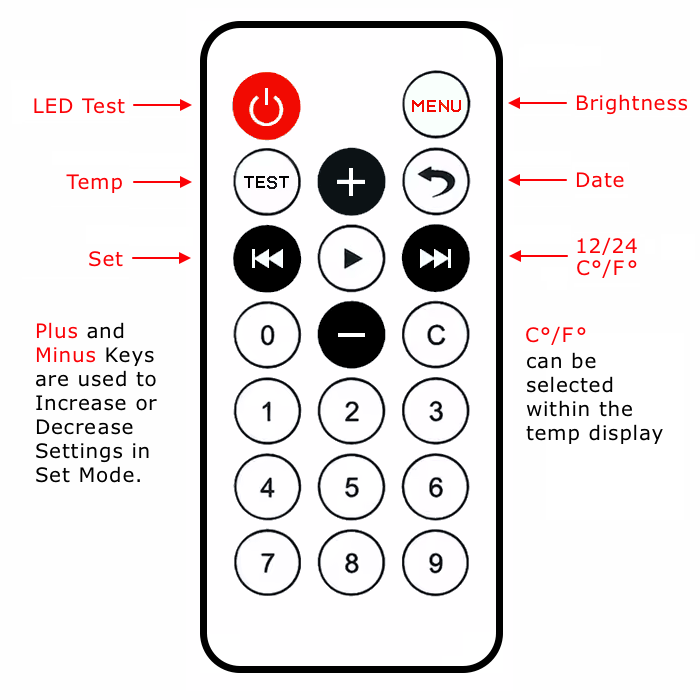
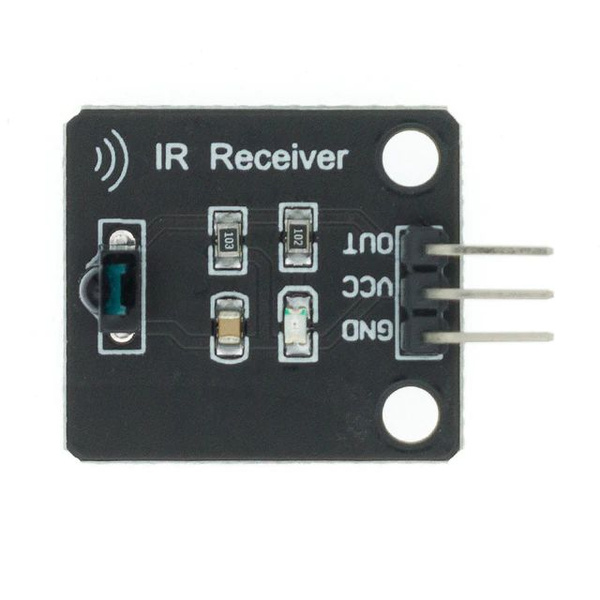
The firmware can be downloaded below.
Web based simulation of my clock
Rick’s version – Version 2.0.0
Version 2.0.1 – Fixed “F” character & temperature compensation
IR code finder – dumps IR codes of pressed button to serial port
IR Finder LCD version – displays the results on an LCD instead
Demo video – my version
Demo video – Rick’s version


I mjust received your original 6 digit clock with a Dynascan remote.
1. Do you have any instructions on the remote buttons?
2. Since this is your original version, can I upgrade using version s software from this site?
3. Do I need another remote to accommodate the update features. Do you offer it and at what price?
4. Do I also need to install the IR Software for the temperature to work.
5, Do I need to get the IR module for this upgrade. What is the part number for it, and can it be plugged into the back?)
Forgot to add, the date is in UK format (DD/MM/YYYY)
Hi Lee,
ah, I see what you mean now. Rick’s version is a variation of mine – works the same way but his has a different display layout and remote control.
Both versions are functionally the same. The one you received is the one you purchased in the eBay listing which includes the Dynascan remote.
Hi Lee,
to answer your questions, the clock already has the latest update (firmware / software) installed. No additional remote is required, it should work as per the youtube video in this post. Note the remote was sent without batteries due to postage rules.
The IR module is included with the clock – it is soldered via the 3 wires to the PCB.
Everything should work as per the first video in this post.
Adrian:
I didn’t see your version of JCLPCB version on EBay. Have you posted it yet. I hope to take your pcb and add an mp3 player to add Westminster chimes to make her happily.
I have worked a Kicad 9.0 version of your clock, but if you have already done it, maybe I should use yours.
Mine of would have add the mp3 player , the ir reader and the clock timer.
Also have you posted your remotes too?
Next years project.
Thanks for your help.
Lee
Hi Lee, there must be some misunderstanding, the eBay listing which you bought was a fully assembled version, I do have a couple of identical spare unpopulated PCB boards which I haven’t listed.
The version on this website is intended for others to make as I have released all project files open source for others to make or modify. I don’t intend to make any more as it’s not cost effective anymore. I made a loss on the ones I have sold already.
Not sure what you mean by my remotes. They are commonly available on eBay but I used a Dynascan remote as I had lots of them and they are better quality.